Page Contents
- 1 How to get a Mudra loan in 2026 100%
- 2 What is a Mudra Loan?
- 3 Types of Mudra Loan in 2026
- 4 1. Shishu Loan
- 5 2. Kishor Loan
- 6 3. Tarun Loan
- 7 Is There Any Subsidy on Mudra Loan in 2026?
- 8 Eligibility for Mudra Loan in 2026
- 9 Documents Required for Mudra Loan
- 10 Identity Proof
- 11 Address Proof
- 12 Business Documents
- 13 Financial Documents
- 14 Business Plan
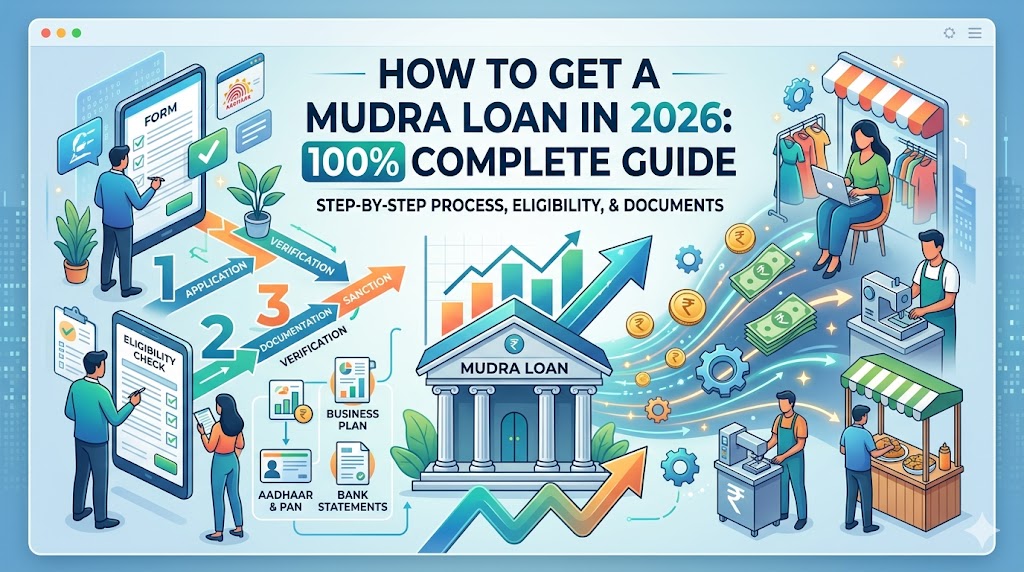
- 15 Step-by-Step Process to Apply for Mudra Loan in 2026
- 16 Step 1: Define Your Business Requirement
- 17 Step 2: Create a Business Plan
- 18 Step 3: Collect All Documents
- 19 Step 4: Choose the Right Bank
- 20 Step 5: Submit Application
- 21 Step 6: Verification Process
- 22 Step 7: Loan Approval and Disbursement
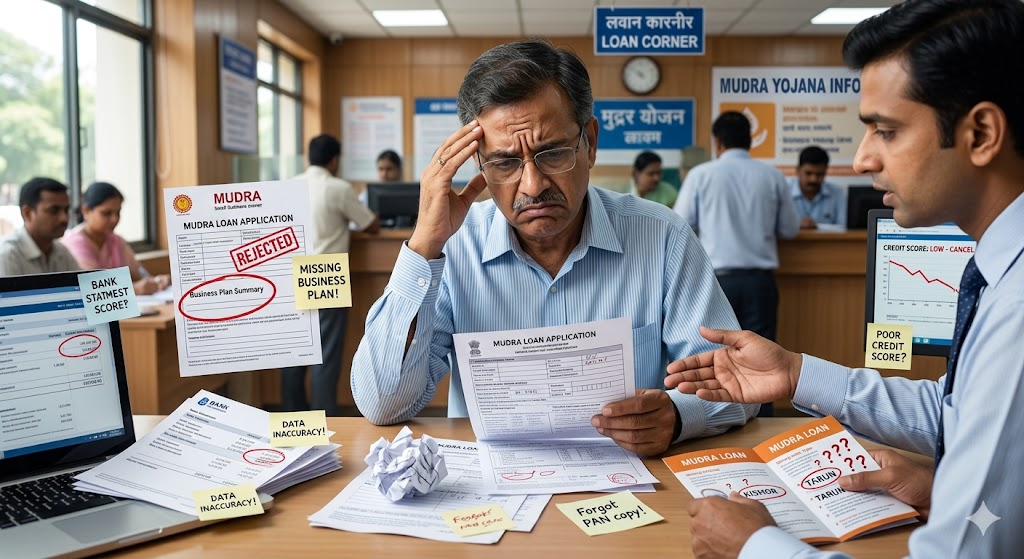
- 23 Common Mistakes to Avoid While Applying for Mudra Loan
- 24 Mistake 1: Incomplete Documents
- 25 Mistake 2: Poor Business Plan
- 26 Mistake 3: Wrong Loan Amount
- 27 Mistake 4: Poor Credit History
- 28 Mistake 5: Incorrect Information
- 29 Mistake 6: No Business Purpose
- 30 What to Do If Your Mudra Loan Application is Rejected?
- 31 1. Ask for the Rejection Reason
- 32 2. Correct the Issues
- 33 3. Improve Your Business Proposal
- 34 4. Apply Through Another Eligible Bank
- 35 5. Register Your Business Properly
- 36 Tips to Increase Mudra Loan Approval Chances in 2026
- 37 Frequently Asked Questions (FAQs)
- 38 Can I get a Mudra Loan without collateral?
- 39 Can women entrepreneurs apply?
- 40 Can startups apply for Mudra Loan?
- 41 Is a subsidy guaranteed with Mudra Loan?
- 42 Final Words
- 43 Disclaimer
How to get a Mudra loan in 2026 100%
Starting a business or expanding a small business requires money. Many people have good business ideas but do not have enough funds. To help small businesses, shop owners, startups, women entrepreneurs, self-employed professionals, and micro enterprises, the Government of India launched the Pradhan Mantri Mudra Yojana (PMMY).
In 2026, Mudra Loan continues to be one of the most popular government-supported business loan schemes in India. It helps people get funding without providing large collateral security.
This guide explains everything about Mudra Loan in simple language.
What is a Mudra Loan?
Mudra Loan is a business loan provided under the Pradhan Mantri Mudra Yojana (PMMY). The scheme supports small businesses, startups, traders, service providers, manufacturers, artisans, and entrepreneurs.
The loan is provided through banks, regional rural banks, small finance banks, cooperative banks, NBFCs, and microfinance institutions.
The primary purpose of the loan is:
- Starting a new business
- Expanding an existing business
- Purchasing equipment
- Working capital requirements
- Business infrastructure development

Types of Mudra Loan in 2026
Mudra Loans are divided into three categories based on business requirements.
1. Shishu Loan
Ideal for new businesses and startups.
Loan Amount:
Up to ₹50,000
Suitable for:
- Small vendors
- Street hawkers
- Home-based businesses
- Small service providers
2. Kishor Loan
For businesses that have already started operations and need expansion.
Loan Amount:
₹50,001 to ₹5 lakh
Suitable for:
- Retail shops
- Small manufacturing units
- Service businesses
- Local entrepreneurs
3. Tarun Loan
For established businesses looking for major growth.
Loan Amount:
₹5 lakh to ₹20 lakh (subject to current government guidelines and bank policies)
Suitable for:
- Growing businesses
- Manufacturing units
- Professional services
- Small industries
Is There Any Subsidy on Mudra Loan in 2026?
One of the biggest misunderstandings is that every Mudra Loan comes with a direct subsidy.
The truth is:
Mudra Loan itself is generally a loan scheme and not a direct subsidy scheme.
However, borrowers may receive benefits under other government programs linked with their business category, such as:
- Women Entrepreneur Schemes
- Stand-Up India Benefits
- PMEGP Subsidy Programs
- State Government Business Subsidies
- MSME Incentive Programs
- Startup Support Schemes
The availability of subsidy depends on:
- Business type
- Location
- Category of applicant
- Government policy at the time of application
Always check with your bank and local MSME office for current subsidy benefits.
Eligibility for Mudra Loan in 2026
You may be eligible if you are:
- Indian citizen
- Business owner
- Startup founder
- Shopkeeper
- Trader
- Manufacturer
- Service provider
- Self-employed professional
- Artisan
- Woman entrepreneur
- Partnership firm
- Proprietorship firm
- Small enterprise
The applicant should have a clear business purpose and repayment capacity.
Documents Required for Mudra Loan
Prepare the following documents before applying:
Identity Proof
- Aadhaar Card
- PAN Card
- Voter ID
- Passport
Address Proof
- Aadhaar Card
- Electricity Bill
- Driving License
Business Documents
- Business registration (if available)
- GST Registration (if applicable)
- Shop Act License
- Udyam Registration
Financial Documents
- Bank statements
- Income proof
- Existing loan details
Business Plan
- Business model
- Estimated investment
- Revenue projections
- Market opportunity
A strong business plan significantly increases approval chances.
Step-by-Step Process to Apply for Mudra Loan in 2026
Step 1: Define Your Business Requirement
Calculate exactly how much money is required.
Avoid asking for a random amount.
Prepare:
- Working capital requirement
- Equipment costs
- Inventory costs
- Expansion expenses
Step 2: Create a Business Plan
Your business plan should include:
- Business idea
- Products or services
- Target customers
- Expected revenue
- Expense estimation
- Loan utilization plan
Banks prefer applicants who have a clear business strategy.
Step 3: Collect All Documents
Keep all documents ready before visiting the bank.
Incomplete documents are one of the biggest reasons for delays.
Step 4: Choose the Right Bank
You can apply through:
- Public Sector Banks
- Private Banks
- Regional Rural Banks
- Small Finance Banks
- NBFCs
Compare:
- Interest rates
- Processing time
- Documentation requirements
Step 5: Submit Application
Fill out the Mudra Loan application carefully.
Double-check:
- Name spelling
- PAN details
- Aadhaar number
- Mobile number
- Business details
Small errors can create unnecessary delays.
Step 6: Verification Process
The bank may verify:
- Your identity
- Business location
- Financial condition
- Business feasibility
Cooperate fully during verification.
Step 7: Loan Approval and Disbursement
After successful verification and assessment, the bank may approve and disburse the loan amount directly into your bank account.
Common Mistakes to Avoid While Applying for Mudra Loan
Many applications are rejected because of avoidable mistakes.
Mistake 1: Incomplete Documents
Missing documents create delays and rejection risks.
Mistake 2: Poor Business Plan
A weak or unrealistic business proposal reduces approval chances.
Mistake 3: Wrong Loan Amount
Requesting an unnecessarily high amount may create concerns for lenders.
Mistake 4: Poor Credit History
Existing loan defaults can impact approval.
Pay EMIs and credit card dues on time.
Mistake 5: Incorrect Information
Never provide false information.
Banks verify applicant details.
Mistake 6: No Business Purpose
The bank must understand how the loan will be used.
Clearly explain your business requirement.
What to Do If Your Mudra Loan Application is Rejected?
A rejection does not mean the end of the process.
Follow these steps:
1. Ask for the Rejection Reason
Request the bank to explain why the application was declined.
2. Correct the Issues
Common reasons include:
- Incomplete documents
- Poor business plan
- Credit score issues
- Insufficient income proof
Resolve these issues before reapplying.
3. Improve Your Business Proposal
Prepare:
- Better financial projections
- Market analysis
- Revenue expectations
A stronger proposal can improve approval chances.
4. Apply Through Another Eligible Bank
Different banks may have different assessment methods.
A rejection from one bank does not guarantee rejection everywhere.
5. Register Your Business Properly
Consider obtaining:
- Udyam Registration
- GST Registration
- Trade License
Formal businesses often appear more credible.
Tips to Increase Mudra Loan Approval Chances in 2026
- Maintain a good credit record.
- Keep bank transactions active.
- Prepare a realistic business plan.
- Submit complete documents.
- Apply for the correct loan category.
- Explain loan utilization clearly.
- Maintain business records.
- Use a professional application format.
Frequently Asked Questions (FAQs)
Can I get a Mudra Loan without collateral?
Yes, many Mudra Loans are provided without traditional collateral, subject to bank policies and eligibility.
Can women entrepreneurs apply?
Yes. Women entrepreneurs are encouraged to apply and may receive additional support under certain schemes.
Can startups apply for Mudra Loan?
Yes. New businesses and startups can apply, especially under the Shishu category.
Is a subsidy guaranteed with Mudra Loan?
No. Subsidies depend on other government schemes and eligibility criteria.
Final Words
Mudra Loan remains one of the best financing options for small businesses and entrepreneurs in India in 2026. Success depends on proper planning, complete documentation, a realistic business proposal, and understanding the bank’s requirements.
Instead of focusing only on getting a loan, focus on building a sustainable business model. Banks are more likely to support applicants who demonstrate clear business potential, responsible financial planning, and repayment capacity.
Disclaimer
The information provided on this website is for educational and informational purposes only. Loan eligibility, interest rates, subsidy benefits, documentation requirements, and government policies may change from time to time. Readers are strongly advised to visit the official website of their preferred bank and the concerned government departments for the latest and most accurate information before applying for a Mudra Loan. This website does not guarantee loan approval and is not affiliated with any bank, financial institution, or government agency.
Thanks to Janpaksh
Keywords
Mudra Loan 2026, PM Mudra Loan Apply Online, Mudra Loan Subsidy, Shishu Loan, Kishor Loan, Tarun Loan, Mudra Loan Eligibility, Mudra Loan Documents, Mudra Loan Rejected, Business Loan Without Collateral, Government Loan for Small Business, PMMY Loan Application